By business type
Inventory for a pharmacy
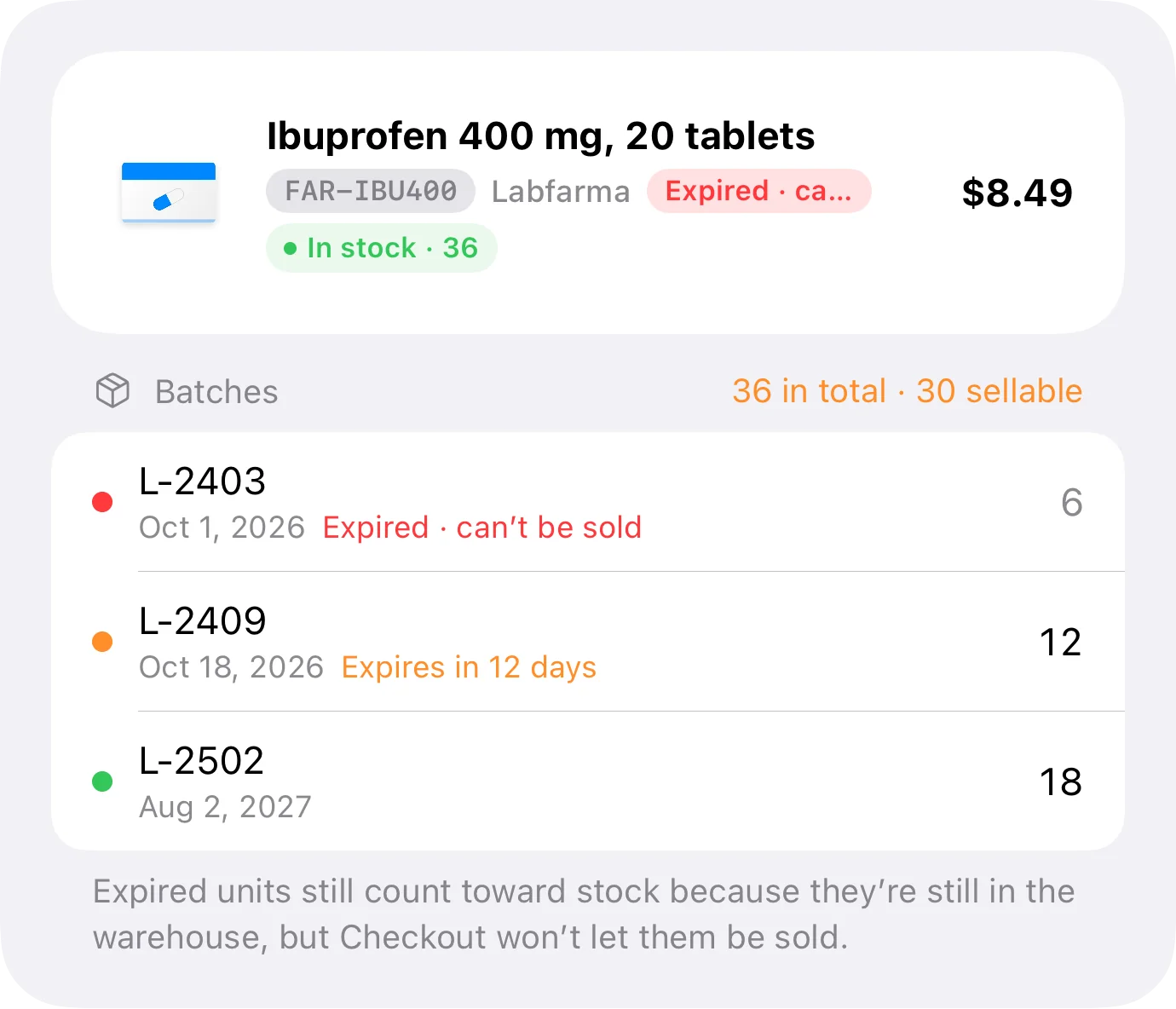
Here stock has a date on it. A correct number in the system can be goods you're no longer allowed to sell, and you only see that if the inventory tracks batches.
In almost any other business, "there are 12 left" is a complete answer. In a pharmacy it isn't: there are 12 left, but four expire next month and three expired in April. Correct stock and sellable stock are not the same number.
That's why a pharmacy can't run on a unit counter. It needs batches: every intake with its own expiry date and its own cost, so the system knows what can go out today and what has to be written off. Inventury tracks batches, and this guide says exactly how far that goes.
Every intake is a batch, with its date and its cost
When the same reference arrives twice, that isn't 24 units — it's two batches. In Inventury each intake is recorded with its expiry date and its own cost, and they stay separate. The item's total is still a single number on screen, but underneath you know what it's made of.
That changes two things the next day: you know which units have to go out first, and you know what those units cost you rather than an average of all of them.
- An expiry date per batch, not one per item
- Its own cost per batch, which is where real margin comes from
- Two purchases of the same reference don't collapse into one number
What's about to expire comes to you
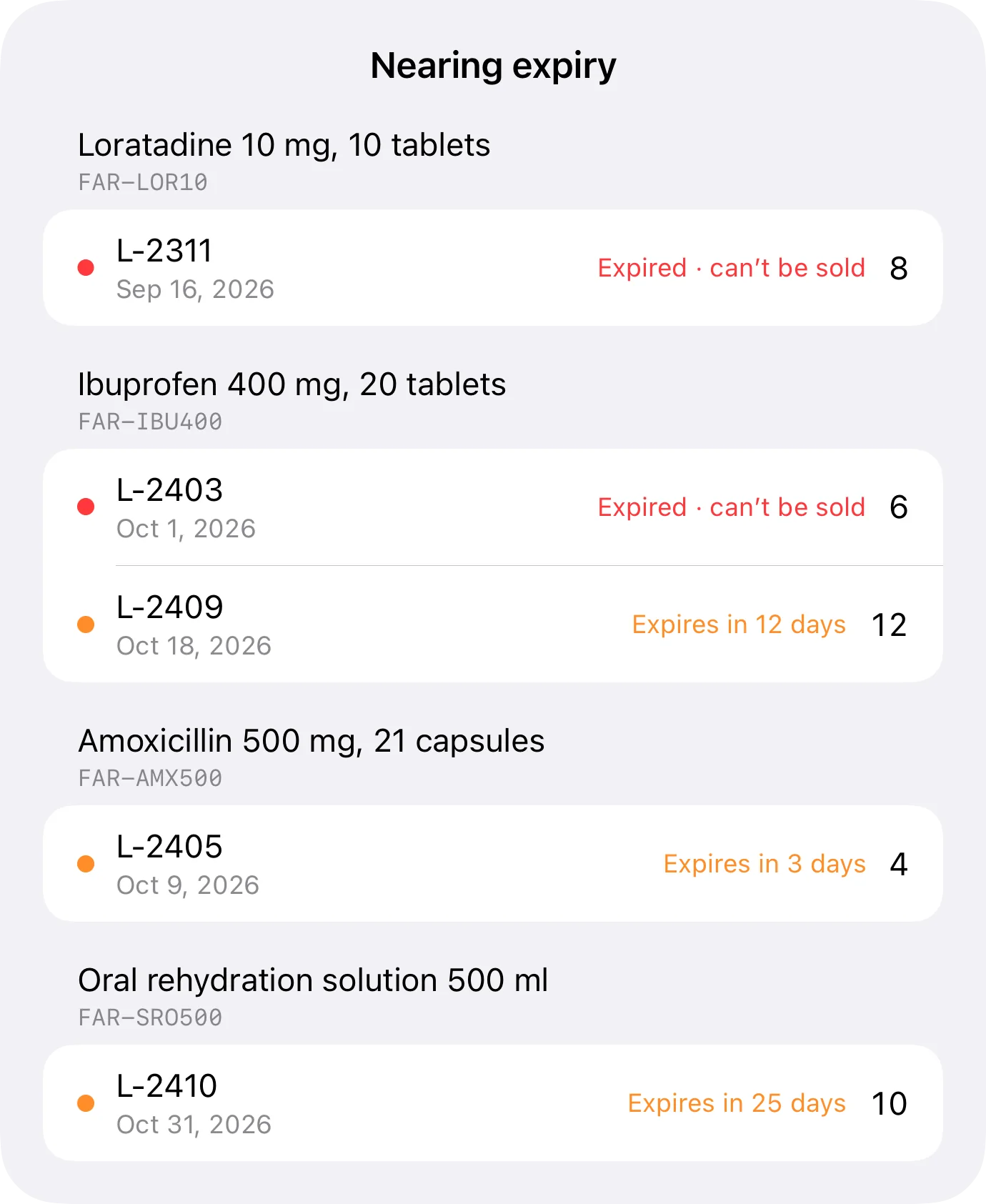
You don't have to open batches one by one to find out. In the item list, the row carries a marker when one of its batches has expired or expires within the next 30 days. You see it while you're doing something else.
And in My business › Expiry there's a row, "Expiring soon", with what has expired and what expires within 30 days, ordered by urgency and counting how many items need attention. That row only exists if some item uses batches, so in a business where nothing expires it stays out of the way.
From there, swiping on an expired batch writes it off. The app asks for confirmation first, because that really does deduct stock.
- A marker on the item row: expired, or expiring within 30 days
- A separate list with everything urgent, ordered by urgency
- Write off an expired batch by swiping, with confirmation
The window is 30 days and can't be changed today. The warnings live inside the app: with the app closed, no notification arrives.
The sale dispatches the earliest expiry by itself
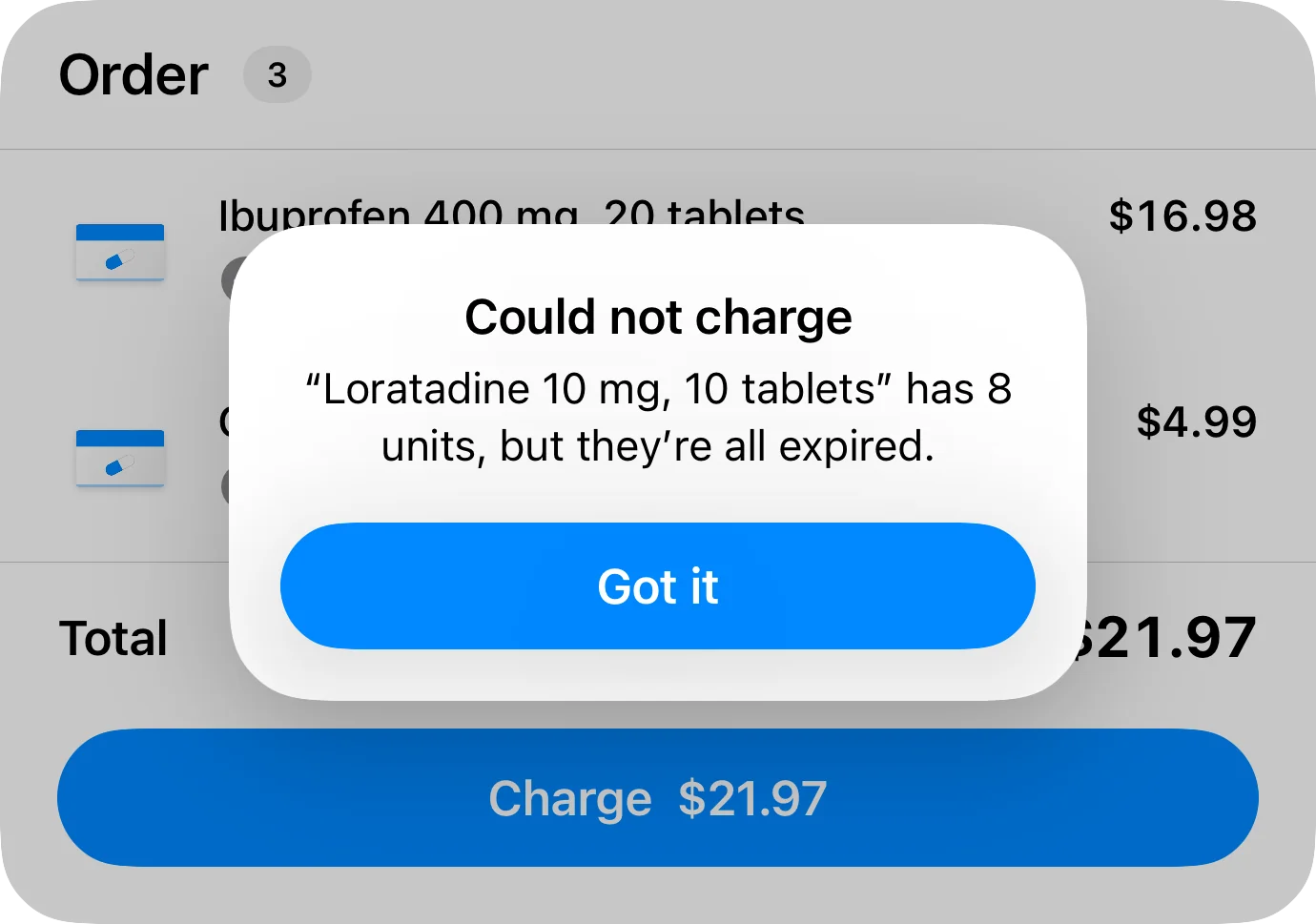
Taking payment at the till doesn't involve picking a batch. The app deducts by FEFO — first expired, first out — and never touches an expired batch. It's the rule a pharmacy applies by hand when someone remembers; here it applies to every payment.
The same goes for whatever sells in your connected web store: it deducts by FEFO too. And here's the one warning that matters in a pharmacy: a sale you record from the item's own page does deduct stock, but today it takes it off the total without going through the batches, so it respects neither FEFO nor the block on expired stock. For items with batches, ring it up at the till.
If there are no sellable units, the till won't take the payment and explains why in those words: "you have 12 units, but they've all expired." Better that than a sale that balances in the system and can't be handed over at the counter.
The cost of that sale comes from the batches that were actually dispatched, not from an average. And web store sales deduct the same way, by FEFO.
- Automatic FEFO at the till and in the web store
- The till is on the Business plan, and it's the recommended route for items with batches
- An expired batch never goes out, not even by mistake
- On its expiry date, a batch can still be sold
- The sale's cost is the cost of the batch that left
The trade-off: the batch can't be chosen by hand — the earliest expiry always goes out.
Margin, when cost changes with every purchase
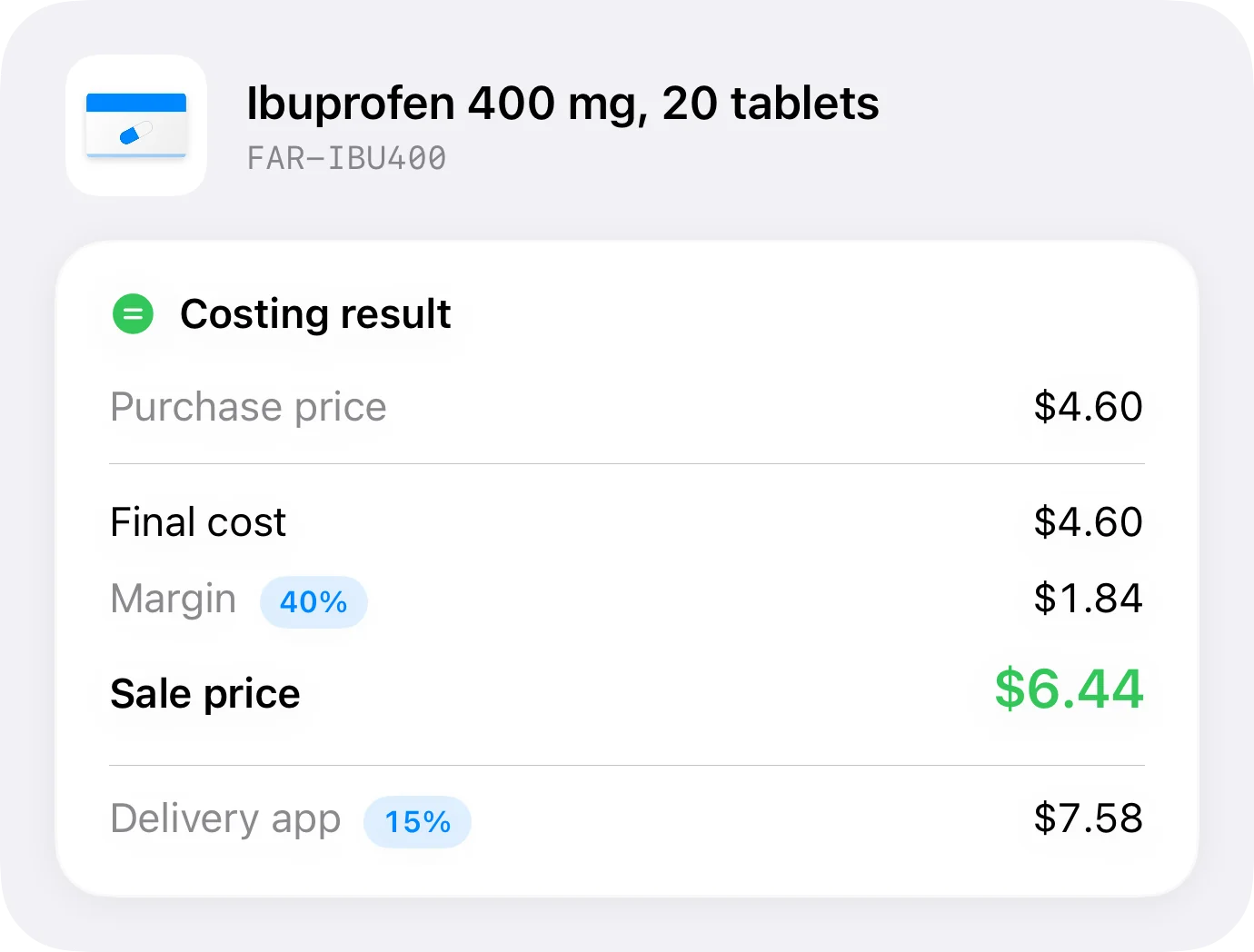
In a pharmacy the cost of the same reference moves between one purchase and the next: a different supplier, a volume discount, a manufacturer's promotion. If the system stores one cost per item, the margin it shows you is the margin from three purchases ago.
Because cost lives in the batch, margin is worked out from what you paid for the units that actually left. And if you also deliver through a platform that charges a fee, the per-channel calculation shows which references survive that percentage and which are being sold at a loss.
What still has to be done by hand
"Expiring soon" is a work list, not a report. It shows the units in each batch, and that's enough to decide what to return to the supplier or rotate first, but it doesn't filter by month, doesn't work out how much money is about to expire, and doesn't export.
And batches belong to the item, not to the variant. If you carry two pack sizes of the same reference with different expiry dates — the box of 10 and the box of 30 — today they're kept as two separate items. It works, but it's a decision to make while building the catalogue, not afterwards.
Cost already lives in the batch, so working out the value of what's about to expire is a matter of displaying it. It's on the list.
How far it goes today
| What a pharmacy needs | In Inventury |
|---|---|
| An expiry date per batch | Yes, with its own cost |
| Expiring-soon warning | Inside the app: a marker on the row and an "Expiring soon" list at 30 days |
| Notification with the app closed | Not yet |
| Changing the 30-day window | Not yet |
| Writing off what has expired | Yes, by swiping on the batch and confirming |
| Selling by FEFO | Automatic at the till (Business plan) and in the web store |
| Selling an item with batches from its own page | It deducts, but today it skips the batches: use the till for those |
| Choosing the batch by hand when selling | No: the earliest expiry always goes out |
| Batches per variant | No: the batch belongs to the item |
| An exportable expiry report | Not yet |
Written 18 September 2026. If any of this changes in the app, this table changes with it.
Frequent questions
Does it warn me when something is about to expire?
Yes, inside the app and without you going to look for it: the item row carries a marker when a batch has expired or expires within the next 30 days, and My business › Expiry has a list of everything urgent. What doesn't exist yet is a notification that arrives with the app closed, and the 30-day window can't be changed.
Can I see everything that expires in one place?
Yes. "Expiring soon", in My business › Expiry, gathers what has expired and what expires within 30 days, ordered by urgency and with the units in each batch. It isn't a report yet: it doesn't filter by month, doesn't calculate the value of what's expiring and doesn't export.
Does a sale deduct from the earliest-expiring batch?
Yes: taking payment at the till deducts by FEFO and never touches expired batches, and so do sales from your connected web store. The batch can't be chosen by hand. If no sellable units are left, the till won't take the payment and says why — for example: "you have 12 units, but they've all expired." A sale recorded from the item's own page also deducts, but today it doesn't go through the batches — skipping FEFO and the block on expired stock — so for items with batches it's better to ring up at the till, which is on the Business plan.
Do batches work per pack size or per product?
Per product. Variants don't carry their own batches, so two pack sizes of the same reference with different expiry dates are kept today as two separate items.
How do I take expired stock out of the inventory?
By swiping on the expired batch in the app and confirming the write-off. Those units stop counting towards the item's stock, so the number goes back to being what you can actually sell.
Does it work with two branches?
Yes. Business allows unlimited stores and locations, each with its own inventory, and reports can be read per location. Pro includes 2 collaborators and Business up to 10, each signing in with their own Apple ID.
Enter one reference with two batches and watch it work
It's on the App Store. Add the same reference with two different expiry dates and sell one unit: you'll see the earlier one go out.